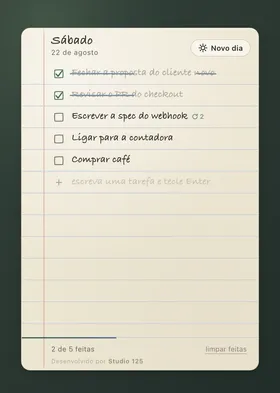
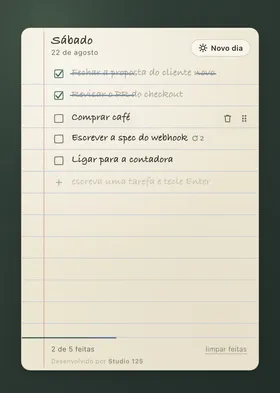

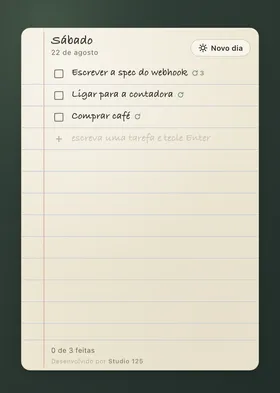
Paper Notes is a widget for macOS and Windows: today’s to-do list, written on a real ruled page. Strike the line when you are done, drag to reorder, and start a new page tomorrow — everything is saved only on your computer, with no account and no cloud.
Why go back to paper
Every modern to-do app solves the same problem with the same kit of parts: categories, tags, priorities, reminders, sync across devices. It is powerful, and it is exactly why nobody can just open the app and write “buy coffee” in two seconds.
Paper Notes goes the other way. There are no categories, no projects, no account to create. It is a page, with lines, for today’s list — the way an organized person already did it before there was an app for that.
Write on the line, as always
Click the blank line, type the task, press Enter. That is the whole interaction — the same as picking up a pen and writing on a paper list, with no menu, no extra field, nothing to set up before the first word.
Marking a task as done strikes the line by hand, with the same imperfection as a real pen — not a straight CSS bar over the text. Esc cancels an edit in progress, and deleting all the text of an existing task removes the line. At the bottom of the page, the counter shows how many of today’s tasks are done, and “clear done” takes the struck lines away without touching what is still left to do.
Drag to reorder
The order of the list is the order of your priorities — so it has to be easy to change. Hold the handle (⠿) on the right of the line and drag; it works with the mouse or, from the keyboard, with Space to pick up the task and the arrow keys to move it.
Tomorrow is always a new page
The New day button archives today’s page and opens a blank one. If any task is still pending, the app asks whether you want to carry it over — and if you say yes, it comes back at the top of the new page, marked with ↻ and the number of days it has been waiting. The question only shows up when something is really pending: with no open tasks, New day simply opens a blank page, ready for the first line of the day.
Technical details
For anyone who wants to know what holds the page up: the interface is React 18 + Vite 6, packaged in an Electron 33 shell. The renderer bundle is 204 KB (66 KB gzip) — light for a desktop app. Your data lives 100% in your computer’s localStorage: no account, no server, no cloud. MIT license.
| Shortcut | Action |
|---|---|
⌘/Ctrl + N | New day |
⌘/Ctrl + Alt + T | Show / hide the widget |
| Double click | Edit the task |
Space + arrows | Reorder from the keyboard |
Esc | Cancel editing |
Get it on your computer
Free, no account and no dependencies to install. Available for:
- macOS — 11 Big Sur or later, with native builds for Apple Silicon (M1/M2/M3/M4) and Intel x64, as a
.dmg. - Windows — Windows 10 or later, with a recommended
.exeinstaller or a portable version that needs no installation.
Because the app is not yet signed by an identified developer, the first launch may trigger a system warning — on macOS, right-click and choose “Open”; on Windows, SmartScreen may ask you to confirm under “More info → Run anyway”.
Who it is for
- People who have tried many to-do apps and none of them stuck. If the problem was always the friction of setting up categories before writing the first line, there is nothing like that to set up here.
- People who think in daily cycles. “A new page every day, with whatever is still pending” is the whole product — not an extra feature.
- People who care where their data lives. No account, no cloud, no telemetry: the list lives only on your computer.
Made by Studio125. Version 1.0.0, code under the MIT license.